
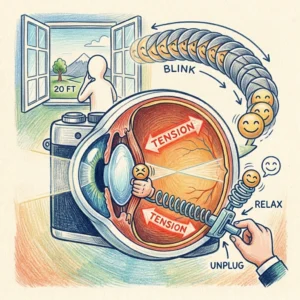
Imagine this: You have been working on your laptop for hours. Emails are flying, deadlines are approaching, and your phone keeps lighting up like it has a personal mission to destroy your concentration. You barely notice the time passing.
Finally, you look up from the screen and glance toward the window.
Something feels off.
The clock across the room looks blurry. The trees outside seem slightly out of focus, and your eyes need a few moments to adjust. You blink, rub your temples, and wonder whether your eyesight is getting worse.
Sound familiar?
If you spend much of your day staring at a computer, smartphone, or tablet, you may have experienced some form of digital eye strain. Your eyes might feel tired, dry, irritated, or heavy. You may even develop a headache after concentrating on nearby objects for too long.
Naturally, you might start worrying about your prescription or search for expensive blue-light glasses, screen filters, and fancy eye-massage gadgets.
But before turning your desk into a miniature optical shop, consider a much simpler habit: take a short break and look at something in the distance.
It sounds almost too easy, doesn’t it? Yet giving your eyes regular breaks from close-up work can help reduce focusing fatigue and discomfort.
The best part? You can try a brief version of this exercise in about 20 seconds, without purchasing anything or downloading another app you will forget to use after three days.
However, there is one important distinction. This technique may help relieve temporary eye strain, but it cannot cure myopia or guarantee that your prescription will remain unchanged. Understanding the difference can help you care for your eyes without falling for exaggerated health claims.
Let’s explore what happens inside your eyes during long screen sessions, how to perform a quick visual break, and what actually helps protect your long-term vision.
1. Meet the Tiny Muscle That Helps Your Eyes Focus
Your eyes are remarkably sophisticated. They work much like a camera, constantly adjusting to help you see objects at different distances.
Inside each eye is a transparent, flexible structure called the crystalline lens. Its job is to bend incoming light so that it focuses correctly on the retina, the light-sensitive tissue at the back of the eye.
Helping this lens change shape is a small ring of muscle fibers known as the ciliary muscle.
Think of it as your eye’s built-in autofocus system.
When you look at something nearby, such as a text message or the tiny ingredients printed on a shampoo bottle, your ciliary muscle contracts. This allows the lens to become rounder and increase its focusing power.
When you look at a distant object, the ciliary muscle generally relaxes, allowing the lens to become flatter.
Your eyes perform these adjustments automatically, without asking your permission or sending you a calendar invitation.
The trouble begins when you spend long periods concentrating on close-up objects without giving your eyes a break.
Your focusing system must repeatedly maintain the effort required for near vision. For some people, this contributes to eye fatigue, headaches, or temporary difficulty shifting focus from a nearby screen to a distant object.
That uncomfortable experience can make you feel as though your eyesight is suddenly deteriorating. Fortunately, temporary focusing difficulty does not necessarily mean you have developed permanent nearsightedness.
2. Why Your Eyes Feel Exhausted After Screen Time
Your eyes were not designed to spend every waking hour staring at a glowing rectangle from the same distance.
When you work, read, scroll, or watch videos, you often hold your gaze on a relatively small area for extended periods. You may also blink less frequently or blink incompletely without realizing it.
This matters because every blink helps spread a thin layer of tears across the surface of your eyes.
That tear film keeps the eye’s surface comfortable and helps maintain clear vision. When blinking becomes less frequent, tears can evaporate more quickly, leaving your eyes feeling dry, gritty, or irritated.
Meanwhile, your focusing system continues working on whatever is directly in front of you.
Put these factors together, and you have a recipe for digital eye strain.
Common symptoms include:
Tired, aching, or burning eyes.
Dryness, watering, or a gritty sensation.
Headaches around the forehead or temples.
Temporary blurred vision after prolonged near work.
Difficulty switching focus between nearby and distant objects.
Neck and shoulder discomfort caused by poor posture.
The good news is that these symptoms often improve when you change your visual habits, take breaks, blink normally, and make your workspace more comfortable.
However, persistent or recurring blurred vision deserves attention. It should not automatically be dismissed as an exhausted eye muscle.
3. Eye Myopia: Is It Really a Muscle Spasm?
Let’s clear up a common misconception about eye myopia.
Myopia, also called nearsightedness, is a refractive error in which distant objects appear blurry while nearby objects are generally easier to see.
In many people, this happens because the eyeball grows longer than ideal for its optical focusing system. In other cases, the shape of the cornea or the optical power of the eye contributes to the problem.
Myopia is not simply a muscle that has become tired after looking at a computer.
There is, however, a related condition called accommodative spasm, in which the focusing system has difficulty relaxing appropriately after sustained near work. This can cause temporary blurred distance vision and sometimes mimic or contribute to a measurement of nearsightedness.
Another term you may encounter is pseudomyopia, which refers to apparent nearsightedness associated with excessive accommodation rather than exclusively with the eye’s underlying refractive structure.
These conditions are related to focusing, but they are not interchangeable with established myopia.
Why does this distinction matter?
Because a short visual break may ease focusing discomfort, but it cannot shorten an elongated eyeball or reverse established structural myopia. Likewise, ordinary screen strain does not automatically mean that your eyes are developing permanent nearsightedness.
Research suggests that prolonged near work and limited time outdoors are associated with myopia risk, particularly in children. However, the relationship is complex, and a single habit or exercise cannot guarantee prevention.
If distant objects remain blurry after a break, or you frequently struggle to shift focus, arrange an eye examination rather than assuming you have a muscle spasm.
4. The 20-Second Distance-Focus Trick
Now for the practical part.
The goal of this quick exercise is simple: interrupt prolonged close-up work, allow your focusing system to shift toward distance vision, and give yourself an opportunity to blink normally.
You do not need to squeeze your eyes shut, move them in circles, or perform an elaborate routine that makes your coworkers wonder whether you are communicating with aliens.
Try these steps instead.
Step 1: Look away from your screen.
Pause what you are doing and lift your gaze from your phone, tablet, or computer.
If possible, sit comfortably and keep your head in a natural position.
Step 2: Find a distant object.
Look at a tree outside your window, a building across the street, or another object farther away. A distance of approximately 20 feet, or 6 metres, is a useful guideline for the familiar 20-20-20 rule.
If you cannot see outside, choose the farthest comfortable point in your room.
Step 3: Blink gently and completely.
While looking into the distance, blink several times at a comfortable pace. Let your eyelids close naturally rather than squeezing them tightly.
There is no need to force 20 rapid blinks. Rapid blinking has not been established as a special method for unlocking the ciliary muscle, and aggressive blinking may feel uncomfortable.
The purpose is simply to restore a natural blinking pattern and help spread the tear film across the surface of your eyes.
Step 4: Keep looking into the distance.
Spend the remaining seconds allowing your gaze to rest on the distant object. Breathe normally and relax your forehead and shoulders.
You are not trying to force your eyes into perfect focus. Just give them a break from close-up work.
Step 5: Return to your task comfortably.
After about 20 seconds, resume working if your eyes feel comfortable.
You may notice that your eyes feel less tense or dry. You might also find it easier to shift your attention away from the screen.
Results vary, however. Some people feel immediate relief, while others need a longer break. If the blur persists, do not keep repeating the exercise in the hope of correcting an underlying vision problem.
Remember, this is a brief eye-break habit, not a treatment for myopia.
5. Why the Classic 20-20-20 Rule Is Worth Trying
You may have heard of the 20-20-20 rule, a popular recommendation for people who spend long periods using digital screens.
The idea is straightforward: every 20 minutes, look at something approximately 20 feet away for at least 20 seconds.
Why use this routine?
First, it interrupts continuous near work and gives your focusing system an opportunity to relax.
Second, it reminds you to blink, which may help relieve discomfort associated with an unstable tear film.
Third, it creates a natural pause in your working day. Instead of leaning closer to your monitor until your nose nearly touches the pixels, you briefly shift your attention and reset your posture.
The precise amount of benefit varies between individuals, and evidence for the exact timing is limited. Nevertheless, taking regular breaks is a practical, low-cost way to manage screen-related discomfort.
Think of the rule as a reminder rather than a magical countdown. Missing a 20-minute interval does not mean you have damaged your eyesight.
And if your eyes are already uncomfortable, there is no reason to wait until the next scheduled break. Look away and rest whenever you need to.
6. Can This Trick Prevent Worsening Myopia?
Here is where it is important to separate a helpful habit from an unrealistic promise.
Taking distance-viewing breaks may reduce symptoms associated with prolonged near work. However, it has not been proven that a 20-second exercise can prevent myopia from worsening or stop the eyeball from elongating.
If you already have myopia, your long-term management depends on factors such as your age, prescription, eye health, and rate of progression.
For children and teenagers, regular outdoor time is associated with a lower risk of developing myopia. Eye-care professionals may also recommend specific myopia-control options for suitable patients, including specially designed spectacle lenses, contact lenses, or atropine eye drops in appropriate cases.
These treatments have different benefits, risks, and suitability requirements. They should be discussed with a qualified eye-care professional rather than selected through online self-treatment.
Adults can also benefit from regular eye examinations and an appropriate prescription. If your vision seems to be changing, an examination can help determine whether the cause is ordinary refractive error, a focusing problem, dry eye, or something else.
The takeaway is simple: use distance breaks to manage screen discomfort, not as a substitute for proper myopia care.
7. Better Alternatives to Relying on Blue-Light Glasses
Blue-light glasses are often marketed as an essential solution for digital eye strain. However, evidence does not show that blue-light-filtering spectacle lenses reliably relieve eye strain from computer use.
That does not mean every pair of glasses is useless. Prescription glasses can help when you have an uncorrected refractive error, and some people benefit from lenses designed for their particular visual needs.
But you do not need to buy expensive accessories before trying basic changes.
Start with these everyday adjustments:
Improve your screen position. Keep your monitor at a comfortable distance and position it slightly below eye level when practical. Increase text size instead of leaning toward the screen.
Reduce distracting glare. Adjust your screen brightness to suit the room, reposition your monitor, and avoid harsh reflections from windows or overhead lighting.
Take regular breaks. Alternate close-up work with brief periods of distance viewing. Stand up, stretch, and move around when possible.
Blink normally. If you notice yourself staring without blinking, pause and blink gently several times. Persistent dryness may require advice from an eye-care professional.
Check your prescription. Outdated or unsuitable glasses can contribute to visual discomfort. An eye examination is more useful than guessing which online gadget might help.
These steps are not glamorous, but neither is spending the entire afternoon squinting at a spreadsheet while your forehead develops a permanent frown.
8. Small Daily Habits That Support Healthier Vision
Looking after your eyes does not have to become another demanding item on your to-do list.
Instead, connect eye breaks with activities you already perform.
After finishing an email, glance out of the window. When you refill your water bottle, give your eyes a moment away from the screen. During a phone call, look into the distance if you are not reading something.
If you work from home, consider taking a short walk outdoors during lunch. Children and teenagers, in particular, should have regular opportunities for outdoor activities, which may help reduce the risk of developing myopia.
You should also avoid holding your phone excessively close to your face for extended periods. Use a comfortable reading distance and enlarge text whenever necessary.
Finally, schedule routine eye examinations according to your age, health, symptoms, and eye-care professional’s advice.
Seek prompt medical assessment if you experience sudden or persistent vision changes, significant eye pain, flashes of light, a sudden increase in floaters, or a curtain-like shadow across your vision. Sudden vision loss is an emergency.
A simple eye-break routine is useful, but knowing when a symptom needs professional attention is just as important.
Final Thoughts: Give Your Eyes a Break, Not a Miracle Promise
Modern life asks a lot of our eyes. We work on laptops, read messages on phones, watch videos on tablets, and somehow still find time to scroll through social media before bed.
No wonder our eyes sometimes feel as though they have completed a full-time job of their own.
The encouraging news is that you can make screen time more comfortable without purchasing a cupboard full of expensive accessories.
Try looking into the distance for 20 seconds, blinking gently, and giving your eyes a brief break from close-up work. Make the habit part of your daily routine, and combine it with comfortable screen positioning, regular movement, and appropriate eye care.
Just remember that temporary screen strain and genuine myopia are different issues. A short break may help tired eyes feel better, but it cannot reverse established nearsightedness or guarantee that your prescription will not change.
If your vision repeatedly blurs, your headaches continue, or distant objects remain difficult to see, arrange an eye examination.
Your eyes deserve care, not fear—and certainly not miracle claims.
So the next time your screen starts looking like a collection of mysterious little squares, pause for a moment. Look away, blink naturally, relax your shoulders, and give your eyes a little breathing room.
Sometimes, the smartest health habit is not another complicated routine. It is simply remembering to take a break.
References
National Eye Institute — Nearsightedness (Myopia).
American Academy of Ophthalmology — Computers, Digital Devices, and Eye Strain